<?xml version="1.0" encoding="utf-8"?><feed xmlns="http://www.w3.org/2005/Atom" ><generator uri="https://jekyllrb.com/" version="3.10.0">Jekyll</generator><link href="http://blog.wytamma.com/feed.xml" rel="self" type="application/atom+xml" /><link href="http://blog.wytamma.com/" rel="alternate" type="text/html" /><updated>2025-12-12T11:44:08+10:00</updated><id>http://blog.wytamma.com/feed.xml</id><title type="html">Wytamma’s Blog</title><subtitle>Enjoying the little things like antibodies, ion channels, and pip installs.</subtitle><author><name>Wytamma Wirth</name></author><entry><title type="html">HPC-GPT: Deploying Private LLMs on the HPC</title><link href="http://blog.wytamma.com/blog/tutorial/hpc-gpt/" rel="alternate" type="text/html" title="HPC-GPT: Deploying Private LLMs on the HPC" /><published>2025-12-09T00:00:00+10:00</published><updated>2025-12-09T00:00:00+10:00</updated><id>http://blog.wytamma.com/blog/tutorial/hpc-gpt</id><content type="html" xml:base="http://blog.wytamma.com/blog/tutorial/hpc-gpt/"><![CDATA[<p>With the rise of large language models (LLMs) like chatGPT, many researchers and developers are interested in deploying their own private instances for various applications. Using private models ensures data privacy and allows for customization to specific use cases. In this post, I’ll guide you through the steps to deploy a private LLM on the Unimelb HPC cluster (Spartan) using <a href="https://ollama.com/">Ollama</a>, an open-source platform for running LLMs locally.</p>

<h2 id="setup-only-do-this-once">Setup (only do this once)</h2>

<p>SSH into the login node and create a <code class="language-plaintext highlighter-rouge">hpc-gpt</code> directory in one of your project folders (or scratch spaces).</p>

<div class="language-bash highlighter-rouge"><div class="highlight"><pre class="highlight"><code><span class="nb">export </span><span class="nv">PROJECT_DIR</span><span class="o">=</span>/data/gpfs/projects/punim1654/hpc-gpt <span class="c"># replace punim1654 with your project path</span>
<span class="nb">mkdir</span> <span class="nt">-p</span> <span class="nv">$PROJECT_DIR</span> <span class="o">&amp;&amp;</span> <span class="nb">cd</span> <span class="nv">$PROJECT_DIR</span>
</code></pre></div></div>

<p class="notice--info"><strong>Warning:</strong> Ensure you have enough storage space in your project for the model files, as they can be quite large (several GBs).</p>

<p>Install the ollama package:</p>

<div class="language-bash highlighter-rouge"><div class="highlight"><pre class="highlight"><code>curl <span class="nt">-L</span> <span class="nt">-o</span> ollama.tar.gz https://github.com/ollama/ollama/releases/latest/download/ollama-linux-amd64.tgz
<span class="nb">tar</span> <span class="nt">-xzf</span> ollama.tar.gz
<span class="nb">rm </span>ollama.tar.gz
<span class="nb">ln</span> <span class="nt">-s</span> <span class="nv">$PROJECT_DIR</span>/bin/ollama <span class="nv">$HOME</span>/.local/bin/ollama
</code></pre></div></div>

<p>Ensure that <code class="language-plaintext highlighter-rouge">~/.local/bin</code> is in your <code class="language-plaintext highlighter-rouge">$PATH</code> then check that ollama is installed correctly:</p>

<div class="language-bash highlighter-rouge"><div class="highlight"><pre class="highlight"><code>ollama <span class="nt">-v</span>
</code></pre></div></div>

<p>Create a job script to run the LLM on the HPC. Below is an example job script (<code class="language-plaintext highlighter-rouge">hpc-gpt.job</code>):</p>

<div class="language-bash highlighter-rouge"><div class="highlight"><pre class="highlight"><code><span class="c">#!/bin/bash</span>
<span class="c">#SBATCH --job-name=hpc-gpt # DO NOT CHANGE</span>

<span class="c">#SBATCH -p gpu-a100-short  # specify GPU partition</span>
<span class="c">#SBATCH --gres=gpu:1 # request 1 GPU</span>
<span class="c">#SBATCH --mem=16G # request 16GB memory</span>
<span class="c">#SBATCH --time=02:00:00 # set a time limit of 2 hours</span>

<span class="nb">export </span><span class="nv">OLLAMA_HOST</span><span class="o">=</span>127.0.0.1:11434

<span class="c"># set OLLAMA_MODELS to the models directory</span>
<span class="c"># this is important so ollama doesn't try to use</span>
<span class="c"># the default path in $HOME/.ollama/models </span>
<span class="c"># we use the path relative to the ollama binary</span>
<span class="c"># installed in your project directory</span>
<span class="nv">ollama_real_path</span><span class="o">=</span><span class="si">$(</span><span class="nb">realpath</span> <span class="si">$(</span>which ollama<span class="si">))</span>
<span class="nb">export </span><span class="nv">OLLAMA_MODELS</span><span class="o">=</span><span class="si">$(</span><span class="nb">dirname</span> <span class="si">$(</span><span class="nb">dirname</span> <span class="nv">$ollama_real_path</span><span class="si">))</span>/models

ollama serve
</code></pre></div></div>

<h2 id="submit-the-job-to-start-the-llm-server">Submit the job to start the LLM server</h2>

<p>Submit the job to the HPC scheduler using <code class="language-plaintext highlighter-rouge">sbatch</code>:</p>

<div class="language-bash highlighter-rouge"><div class="highlight"><pre class="highlight"><code>sbatch hpc-gpt.job
</code></pre></div></div>

<p>This will start the LLM server on a compute node. You can check the status of your job using <code class="language-plaintext highlighter-rouge">squeue</code>:</p>

<div class="language-bash highlighter-rouge"><div class="highlight"><pre class="highlight"><code>squeue <span class="nt">-u</span> <span class="nv">$USER</span>
</code></pre></div></div>

<h2 id="interact-with-the-llm-on-the-hpc">Interact with the LLM on the HPC</h2>

<p>Once the job is running you can now interact with the LLM using the Ollama CLI or any compatible client.</p>

<p>First, set up port forwarding to connect to the LLM server running on the compute node.</p>

<div class="language-bash highlighter-rouge"><div class="highlight"><pre class="highlight"><code><span class="nv">NODE</span><span class="o">=</span><span class="si">$(</span>squeue <span class="nt">-u</span> <span class="nv">$USER</span> <span class="nt">-n</span> hpc-gpt <span class="nt">-o</span> <span class="s1">'%i %N'</span> | <span class="nb">sort</span> <span class="nt">-nr</span> | <span class="nb">awk</span> <span class="s1">'NR==1{print $2}'</span><span class="si">)</span>
ssh <span class="nt">-f</span> <span class="nt">-N</span> <span class="nt">-L</span> 11434:127.0.0.1:11434 <span class="nv">$USER</span>@<span class="nv">$NODE</span>
</code></pre></div></div>

<p>Then, you can send a prompt to a model with the ollama CLI:</p>

<div class="language-bash highlighter-rouge"><div class="highlight"><pre class="highlight"><code>ollama run qwen3-vl:2b <span class="s2">"Hello, how can I use LLMs on HPC?"</span>
</code></pre></div></div>

<p>You can start an interactive session with the model using:</p>

<div class="language-bash highlighter-rouge"><div class="highlight"><pre class="highlight"><code>ollama run qwen3-vl:2b
</code></pre></div></div>

<p>A list of available models can be found on the <a href="https://ollama.com/models">Ollama models page</a>.</p>

<p class="notice--info"><strong>Note:</strong> If port 11434 is already in use you can change the local port in the <code class="language-plaintext highlighter-rouge">-L</code> option to another unused port (e.g., <code class="language-plaintext highlighter-rouge">-L 11435:127.0.0.1:11434</code>) and adjust the <code class="language-plaintext highlighter-rouge">OLLAMA_HOST</code> environment variable accordingly when interacting with the model.</p>

<div class="language-bash highlighter-rouge"><div class="highlight"><pre class="highlight"><code><span class="nv">OLLAMA_HOST</span><span class="o">=</span>127.0.0.1:11435 ollama run qwen3-vl:2b <span class="s2">"Hello, how can I use LLMs on HPC?"</span>
</code></pre></div></div>

<h2 id="connect-to-the-llm-server-from-your-local-machine">Connect to the LLM server from your local machine</h2>

<p>Once the job is running in a job, you need to set up port forwarding to connect to the LLM server from your local machine.</p>

<p>Replace <code class="language-plaintext highlighter-rouge">wytamma</code> with your HPC username and run the following command on your local machine:</p>

<div class="language-bash highlighter-rouge"><div class="highlight"><pre class="highlight"><code><span class="nb">export </span><span class="nv">HPC_USERNAME</span><span class="o">=</span>wytamma
<span class="nb">export </span><span class="nv">HOSTNAME</span><span class="o">=</span>spartan.hpc.unimelb.edu.au

<span class="nv">NODE</span><span class="o">=</span><span class="si">$(</span>ssh <span class="k">${</span><span class="nv">HPC_USERNAME</span><span class="k">}</span>@<span class="k">${</span><span class="nv">HOSTNAME</span><span class="k">}</span> <span class="se">\</span>
    <span class="s2">"squeue -u </span><span class="se">\$</span><span class="s2">USER -n hpc-gpt -o '%i %N' </span><span class="se">\</span><span class="s2">
        | sort -nr </span><span class="se">\</span><span class="s2">
        | awk 'NR==1{print </span><span class="se">\$</span><span class="s2">2}'"</span><span class="si">)</span>

ssh <span class="nt">-N</span> <span class="nt">-J</span> <span class="k">${</span><span class="nv">HPC_USERNAME</span><span class="k">}</span>@<span class="k">${</span><span class="nv">HOSTNAME</span><span class="k">}</span> <span class="se">\</span>
    <span class="k">${</span><span class="nv">HPC_USERNAME</span><span class="k">}</span>@<span class="k">${</span><span class="nv">NODE</span><span class="k">}</span> <span class="se">\</span>
    <span class="nt">-L</span> 11434:127.0.0.1:11434
</code></pre></div></div>

<p>You can now navigate to <a href="http://127.0.0.1:11434">http://127.0.0.1:11434</a> in your web browser to confirm the LLM server is running.</p>

<p class="notice--info">If you have <a href="https://dashboard.hpc.unimelb.edu.au/ssh/#passwordless-ssh">passwordless ssh set up</a> you can create a script to automate starting the job and setting up port forwarding all from your local machine. An example script (<code class="language-plaintext highlighter-rouge">start-llm-on-hpc</code>) is provided in <a href="https://gist.github.com/Wytamma/d68c9e85b2832e72d03f447eca57f795">this gist</a>.</p>

<h2 id="adding-a-chat-gui">Adding a Chat GUI</h2>

<p>There are several open-source web-based chat interfaces that you can use to interact with your LLM server.</p>

<p><img src="/assets/images/hpc-gpt-page-assist.png" alt="" /></p>

<p>One such interface is <a href="https://chromewebstore.google.com/detail/page-assist-a-web-ui-for/jfgfiigpkhlkbnfnbobbkinehhfdhndo">Page Assist</a>, a Chrome extension that provides a web UI for interacting with LLMs. Once you have set up port forwarding as described above, you can configure it to connect to the HPC LLM server by setting the API endpoint to <code class="language-plaintext highlighter-rouge">http://127.0.0.1:11434</code>.</p>

<h2 id="conclusion">Conclusion</h2>

<p>In this post, I’ve detailed how to deploy a private LLM on an Unimelb HPC cluster using Ollama. This setup allows you to leverage powerful compute resources while maintaining data privacy. You can further customize the deployment by adding different models or integrating with various applications. If you have any questions or comments, please feel free to reach out.</p>]]></content><author><name>Wytamma Wirth</name></author><category term="Blog" /><category term="Tutorial" /><category term="hpc" /><category term="llm" /><category term="AI" /><summary type="html"><![CDATA[With the rise of large language models (LLMs) like chatGPT, many researchers and developers are interested in deploying their own private instances for various applications. Using private models ensures data privacy and allows for customization to specific use cases. In this post, I’ll guide you through the steps to deploy a private LLM on the Unimelb HPC cluster (Spartan) using Ollama, an open-source platform for running LLMs locally.]]></summary></entry><entry><title type="html">Installing and running Phastest with Apptainer on HPC</title><link href="http://blog.wytamma.com/blog/tutorial/phastest-apptainer/" rel="alternate" type="text/html" title="Installing and running Phastest with Apptainer on HPC" /><published>2025-11-17T00:00:00+10:00</published><updated>2025-11-17T00:00:00+10:00</updated><id>http://blog.wytamma.com/blog/tutorial/phastest-apptainer</id><content type="html" xml:base="http://blog.wytamma.com/blog/tutorial/phastest-apptainer/"><![CDATA[<p><a href="https://apptainer.org/">Apptainer</a> (formerly Singularity) is a container platform that allows you to create and run containers that package up software in a way that is portable and reproducible. Apptainer is the preferred container platform for HPC clusters as each container is only a single file and users don’t need root access to run the containers.</p>

<p>In this post, I’ll detail how to install <a href="https://phastest.ca/">Phastest</a>, a tool for rapid identificationrapid identification, annotation and visualization of prophage sequences within bacterial genomes and plasmids.</p>

<h2 id="setup-once">Setup (once)</h2>
<p>SSH into the login node (hint: use the VS Code Remote extension). Create a directory to hold the container and its data:</p>

<div class="language-bash highlighter-rouge"><div class="highlight"><pre class="highlight"><code><span class="nv">CONTAINER_DIR</span><span class="o">=</span><span class="nv">$HOME</span>/containers/
<span class="nb">mkdir</span> <span class="nt">-p</span> <span class="nv">$CONTAINER_DIR</span>/bin/
</code></pre></div></div>

<p>Download and extract the Phastest Apptainer container and database:</p>

<div class="language-bash highlighter-rouge"><div class="highlight"><pre class="highlight"><code>wget <span class="nt">-O</span> <span class="nv">$CONTAINER_DIR</span>/phastest-docker.zip https://phastest.ca/download_file/phastest-docker
unzip <span class="nv">$CONTAINER_DIR</span>/phastest-docker.zip <span class="s2">"phastest/*"</span> <span class="nt">-d</span> <span class="nv">$CONTAINER_DIR</span>
<span class="nb">rm</span> <span class="nv">$CONTAINER_DIR</span>/phastest-docker.zip
</code></pre></div></div>

<p>Download and extract the Phastest database (3GB):</p>
<div class="language-bash highlighter-rouge"><div class="highlight"><pre class="highlight"><code>wget <span class="nt">-O</span> <span class="nv">$CONTAINER_DIR</span>/docker-database.zip https://phastest.ca/download_file/docker-database
unzip <span class="nv">$CONTAINER_DIR</span>/docker-database.zip <span class="s2">"DB/*"</span> <span class="nt">-d</span> <span class="nv">$CONTAINER_DIR</span>/phastest/phastest-app-docker
<span class="nb">rm</span> <span class="nv">$CONTAINER_DIR</span>/docker-database.zip
</code></pre></div></div>

<p>Create wrapper script to run Phastest using Apptainer and copy results to current working directory:</p>
<div class="language-bash highlighter-rouge"><div class="highlight"><pre class="highlight"><code><span class="nb">cat</span> <span class="o">&gt;</span> <span class="nv">$CONTAINER_DIR</span>/bin/phastest <span class="o">&lt;&lt;</span> <span class="sh">'</span><span class="no">EOF</span><span class="sh">'
#! /bin/sh
set -e
set -o pipefail

output_dir="./phastest-results"

# Parse command line arguments.
while getopts ":i:m:a:s:o:-:" opt; do
    case </span><span class="nv">$opt</span><span class="sh"> in
        i)
            input_type=</span><span class="nv">$OPTARG</span><span class="sh">
            ;;
        m)
            anno_mode=</span><span class="nv">$OPTARG</span><span class="sh">
            ;;
        a)
            accession=</span><span class="nv">$OPTARG</span><span class="sh">
            ;;
        s)
            sequence=</span><span class="nv">$OPTARG</span><span class="sh">
            ;;
        o)
            output_dir=</span><span class="nv">$OPTARG</span><span class="sh">
            ;;
        -)
            case </span><span class="nv">$OPTARG</span><span class="sh"> in
                yes)
                    skip_confirmation=1
                    ;;
                silent)
                    silent=1
                    ;;
                phage-only)
                    complete_annotation=0
                    phage_only=1
                    ;;
                *)
                    echo "Invalid option: --</span><span class="nv">$OPTARG</span><span class="sh">" &gt;&amp;2
                    exit 1
                    ;;
            esac
            ;;
        </span><span class="se">\?</span><span class="sh">)
            echo "Invalid option: -</span><span class="nv">$OPTARG</span><span class="sh">" &gt;&amp;2
            exit 1
            ;;
        :)
            echo "Option -</span><span class="nv">$OPTARG</span><span class="sh"> requires an argument." &gt;&amp;2
            exit 1
            ;;
    esac
done

PHASTEST=</span><span class="nv">$HOME</span><span class="sh">/containers/phastest/

# if sequence is provided link it to the input directory
if [[ -n "</span><span class="nv">$sequence</span><span class="sh">" ]]; then
    # check it exists
    if [[ ! -f "</span><span class="nv">$sequence</span><span class="sh">" ]]; then
        echo "Error: sequence file </span><span class="nv">$sequence</span><span class="sh"> does not exist." &gt;&amp;2
        exit 1
    fi
    mkdir -p </span><span class="nv">$PHASTEST</span><span class="sh">/phastest_inputs/
    ln -sf </span><span class="nv">$sequence</span><span class="sh"> </span><span class="nv">$PHASTEST</span><span class="sh">/phastest_inputs/</span><span class="si">$(</span><span class="nb">basename</span> <span class="nv">$sequence</span><span class="si">)</span><span class="sh">
fi

apptainer run </span><span class="se">\</span><span class="sh">
  --hostname slurmctld </span><span class="se">\</span><span class="sh">
  --bind </span><span class="nv">$PHASTEST</span><span class="sh">/phastest-app-docker/sub_programs/ncbi-blast-2.3.0+:/BLAST+ </span><span class="se">\</span><span class="sh">
  --bind </span><span class="nv">$PHASTEST</span><span class="sh">/phastest-app-docker/sub_programs/ncbi-blast-2.3.0+:/root/BLAST+ </span><span class="se">\</span><span class="sh">
  --bind </span><span class="nv">$PHASTEST</span><span class="sh">/phastest-app-docker:/phastest-app </span><span class="se">\</span><span class="sh">
  --bind </span><span class="nv">$PHASTEST</span><span class="sh">/phastest-app-docker:/root/phastest-app </span><span class="se">\</span><span class="sh">
  --bind </span><span class="nv">$PHASTEST</span><span class="sh">/phastest_inputs:/phastest_inputs </span><span class="se">\</span><span class="sh">
  --writable-tmpfs </span><span class="se">\</span><span class="sh">
  docker://wishartlab/phastest-docker-single </span><span class="se">\</span><span class="sh">
  phastest </span><span class="se">\</span><span class="sh">
    -i "</span><span class="nv">$input_type</span><span class="sh">" </span><span class="se">\</span><span class="sh">
    </span><span class="si">$(</span> <span class="o">[</span> <span class="nt">-n</span> <span class="s2">"</span><span class="nv">$anno_mode</span><span class="s2">"</span> <span class="o">]</span> <span class="o">&amp;&amp;</span> <span class="nb">echo</span> <span class="s2">"-m </span><span class="nv">$anno_mode</span><span class="s2">"</span> <span class="si">)</span><span class="sh"> </span><span class="se">\</span><span class="sh">
    </span><span class="si">$(</span> <span class="o">[</span> <span class="nt">-n</span> <span class="s2">"</span><span class="nv">$accession</span><span class="s2">"</span> <span class="o">]</span> <span class="o">&amp;&amp;</span> <span class="nb">echo</span> <span class="s2">"-a </span><span class="nv">$accession</span><span class="s2">"</span> <span class="si">)</span><span class="sh"> </span><span class="se">\</span><span class="sh">
    </span><span class="si">$(</span> <span class="o">[</span> <span class="nt">-n</span> <span class="s2">"</span><span class="nv">$sequence</span><span class="s2">"</span> <span class="o">]</span> <span class="o">&amp;&amp;</span> <span class="nb">echo</span> <span class="s2">"-s </span><span class="nv">$sequence</span><span class="s2">"</span> <span class="si">)</span><span class="sh"> </span><span class="se">\</span><span class="sh">
    </span><span class="si">$(</span> <span class="o">[</span> <span class="nt">-n</span> <span class="s2">"</span><span class="nv">$skip_confirmation</span><span class="s2">"</span> <span class="o">]</span> <span class="o">&amp;&amp;</span> <span class="nb">echo</span> <span class="s2">"--yes"</span> <span class="si">)</span><span class="sh"> </span><span class="se">\</span><span class="sh">
    </span><span class="si">$(</span> <span class="o">[</span> <span class="nt">-n</span> <span class="s2">"</span><span class="nv">$silent</span><span class="s2">"</span> <span class="o">]</span> <span class="o">&amp;&amp;</span> <span class="nb">echo</span> <span class="s2">"--silent"</span> <span class="si">)</span><span class="sh"> </span><span class="se">\</span><span class="sh">
    </span><span class="si">$(</span> <span class="o">[</span> <span class="nt">-n</span> <span class="s2">"</span><span class="nv">$phage_only</span><span class="s2">"</span> <span class="o">]</span> <span class="o">&amp;&amp;</span> <span class="nb">echo</span> <span class="s2">"--phage-only"</span> <span class="si">)</span><span class="sh">

# move the output file to the current working directory
if [[ </span><span class="nv">$input_type</span><span class="sh"> != "genbank" ]]; then
    filename=</span><span class="si">$(</span><span class="nb">basename</span> <span class="nv">$sequence</span><span class="si">)</span><span class="sh">
    job_id="</span><span class="k">${</span><span class="nv">filename</span><span class="p">%.*</span><span class="k">}</span><span class="sh">"
else 
    job_id="</span><span class="nv">$accession</span><span class="sh">"
fi

# remove input sequence link if it was created
if [[ -n "</span><span class="nv">$sequence</span><span class="sh">" ]]; then
    rm </span><span class="nv">$PHASTEST</span><span class="sh">/phastest_inputs/</span><span class="si">$(</span><span class="nb">basename</span> <span class="nv">$sequence</span><span class="si">)</span><span class="sh">
fi

mkdir -p </span><span class="nv">$output_dir</span><span class="sh">
rm -rf </span><span class="nv">$output_dir</span><span class="sh">/</span><span class="nv">$job_id</span><span class="sh">
mv </span><span class="nv">$PHASTEST</span><span class="sh">/phastest-app-docker/JOBS/</span><span class="nv">$job_id</span><span class="sh"> </span><span class="nv">$output_dir</span><span class="sh">/</span><span class="nv">$job_id</span><span class="sh">
echo "Results moved to </span><span class="nv">$output_dir</span><span class="sh">/</span><span class="nv">$job_id</span><span class="sh">"
</span><span class="no">EOF
</span></code></pre></div></div>

<p>Make the wrapper script executable (ensure .local/bin is in your PATH):</p>
<div class="language-bash highlighter-rouge"><div class="highlight"><pre class="highlight"><code><span class="nb">install</span> <span class="nt">-m</span> 755 <span class="nv">$CONTAINER_DIR</span>/bin/phastest <span class="s2">"</span><span class="nv">$HOME</span><span class="s2">/.local/bin/phastest"</span>
</code></pre></div></div>

<h2 id="usage">Usage</h2>
<p>You can now run Phastest using the <code class="language-plaintext highlighter-rouge">phastest</code> command. For example, to analyse a GenBank file with accession <code class="language-plaintext highlighter-rouge">NC_000907.1</code>, run:</p>

<div class="language-bash highlighter-rouge"><div class="highlight"><pre class="highlight"><code>phastest <span class="nt">-i</span> genbank <span class="nt">-a</span> NC_000907.1 <span class="nt">--yes</span> <span class="nt">--phage-only</span>
</code></pre></div></div>
<div class="language-plaintext highlighter-rouge"><div class="highlight"><pre class="highlight"><code>Running PHASTEST
Job ID: NC_000907.1
Available space of /phastest-app/JOBS is 20G
Handle gbk file...
Generating fna file from gbk ...
NC_000907.1.fna created!
Generating ptt file from gbk ...
Generating faa file from gbk ...
Running phage search ...
Progress: [==================== ] 100%
Fork is done ...
Scanning for phage regions ...
Annotating proteins in regions ...
Get true regions ...
true_defective_prophage.txt generated!
Cleaning up ...
Program exit!
</code></pre></div></div>]]></content><author><name>Wytamma Wirth</name></author><category term="Blog" /><category term="Tutorial" /><category term="singularity" /><category term="apptainer" /><category term="hpc" /><category term="containers" /><summary type="html"><![CDATA[Apptainer (formerly Singularity) is a container platform that allows you to create and run containers that package up software in a way that is portable and reproducible. Apptainer is the preferred container platform for HPC clusters as each container is only a single file and users don’t need root access to run the containers.]]></summary></entry><entry><title type="html">Auto-Scope: An open source whole slide scanner</title><link href="http://blog.wytamma.com/project/auto-scope/" rel="alternate" type="text/html" title="Auto-Scope: An open source whole slide scanner" /><published>2025-06-17T00:00:00+10:00</published><updated>2025-06-17T00:00:00+10:00</updated><id>http://blog.wytamma.com/project/auto-scope</id><content type="html" xml:base="http://blog.wytamma.com/project/auto-scope/"><![CDATA[<p>I’m feeling nostalgic for the time my Python friend Eike and I built a whole slide scanner from scratch. It was a fun project that combined my interests in pathology, automation, and open source software.</p>

<p>Here’s a video of my talk about the project at the PyCon Australia 2021 conference:</p>

<iframe width="560" height="315" src="https://www.youtube.com/embed/vT4mhZHoHtI?si=iprfDEJXb6_eVvTJ" title="YouTube video player" frameborder="0" allow="accelerometer; autoplay; clipboard-write; encrypted-media; gyroscope; picture-in-picture; web-share" referrerpolicy="strict-origin-when-cross-origin" allowfullscreen=""></iframe>

<p>And a link to the blog following the project development: <a href="https://python-friends.github.io/">https://python-friends.github.io/</a></p>]]></content><author><name>Wytamma Wirth</name></author><category term="project" /><category term="pathology" /><category term="automation" /><category term="open source" /><category term="one health" /><summary type="html"><![CDATA[I’m feeling nostalgic for the time my Python friend Eike and I built a whole slide scanner from scratch. It was a fun project that combined my interests in pathology, automation, and open source software.]]></summary></entry><entry><title type="html">Run RStudio on Unimelb Spartan HPC</title><link href="http://blog.wytamma.com/blog/RStudio-Spartan/" rel="alternate" type="text/html" title="Run RStudio on Unimelb Spartan HPC" /><published>2025-04-29T00:00:00+10:00</published><updated>2025-04-29T00:00:00+10:00</updated><id>http://blog.wytamma.com/blog/RStudio-Spartan</id><content type="html" xml:base="http://blog.wytamma.com/blog/RStudio-Spartan/"><![CDATA[<p>I’ve written a few different <a href="https://blog.wytamma.com/blog/hpc-rstudio/">posts</a> and <a href="https://blog.wytamma.com/remote-computing-bioinfo-clinic/#rstudio-server">tutorials</a> about how to run RStudio on an HPC using RStudio Server. In this post, I’ll detail the process specifically for the Unimelb Spartan HPC.</p>

<p>Once you have RStudio running on the Unimelb HPC, you can perform interactive analysis with Spartan’s vast compute resources.</p>

<h2 id="containers">Containers</h2>

<p>Container platforms (Docker, Apptainer—previously known as Singularity, etc.) allow you to create and run containers that package up software in a way that is portable and reproducible.</p>

<p>The Unimelb Spartan HPC uses <a href="https://dashboard.hpc.unimelb.edu.au/software/containers">Apptainer</a> to run containers. This lets you run RStudio in a container on the compute nodes while maintaining the security of the host system.</p>

<h2 id="setup-once">Setup (once)</h2>

<ol>
  <li>
    <p>SSH into the login node (hint: use the VS Code Remote extension) and create a containers directory:</p>

    <div class="language-bash highlighter-rouge"><div class="highlight"><pre class="highlight"><code> <span class="nb">mkdir</span> <span class="nt">-p</span> <span class="nv">$HOME</span>/containers/rstudio/
</code></pre></div>    </div>
  </li>
  <li>
    <p>Download the latest tidyverse container in Singularity image format (<code class="language-plaintext highlighter-rouge">.sif</code>) to your new directory:</p>

    <div class="language-bash highlighter-rouge"><div class="highlight"><pre class="highlight"><code> module purge
 module load GCCcore/11.3.0
 module load Apptainer/1.1.8

 singularity pull <span class="se">\</span>
   <span class="nv">$HOME</span>/containers/rstudio/tidyverse_latest.sif <span class="se">\</span>
   docker://rocker/tidyverse:latest
</code></pre></div>    </div>
  </li>
  <li>
    <p>Create the RStudio “job” script and make it executable:</p>

    <div class="language-bash highlighter-rouge"><div class="highlight"><pre class="highlight"><code> wget <span class="nt">-O</span> <span class="nv">$HOME</span>/containers/rstudio/rstudio.job <span class="se">\</span>
   https://gist.githubusercontent.com/Wytamma/4d5a8f763aa602deaee0bfbd64d1a3ae/raw/e08527234b5d13c3a6bf65c7f1c3aa72612d36ce/rstudio.spartan.job

 <span class="nb">chmod </span>u+x <span class="nv">$HOME</span>/containers/rstudio/rstudio.job
</code></pre></div>    </div>
  </li>
  <li>
    <p>Download the submission wrapper into your $PATH (e.g. <code class="language-plaintext highlighter-rouge">\$HOME/.local/bin/rstudio</code>) and make it executable:</p>

    <div class="language-bash highlighter-rouge"><div class="highlight"><pre class="highlight"><code> wget <span class="nt">-O</span> <span class="nv">$HOME</span>/.local/bin/rstudio <span class="se">\</span>
   https://gist.githubusercontent.com/Wytamma/4d5a8f763aa602deaee0bfbd64d1a3ae/raw/3e996c64b79c864b8e11984b8e01c053f7303012/rstudio.spartan.submit

 <span class="nb">chmod </span>u+x <span class="nv">$HOME</span>/.local/bin/rstudio
</code></pre></div>    </div>
  </li>
</ol>

<p>You should now be able to run:</p>

<div class="language-bash highlighter-rouge"><div class="highlight"><pre class="highlight"><code>rstudio <span class="nt">--help</span>
</code></pre></div></div>

<h2 id="run-rstudio">Run RStudio</h2>

<p>Submit a job to start RStudio on a compute node:</p>

<div class="language-bash highlighter-rouge"><div class="highlight"><pre class="highlight"><code>rstudio
</code></pre></div></div>

<p>By default, it requests 4 cores and 16 GB of RAM. To customize:</p>

<div class="language-bash highlighter-rouge"><div class="highlight"><pre class="highlight"><code>rstudio <span class="nt">--cpus</span> 8 <span class="nt">--mem</span> 32G
</code></pre></div></div>

<p>Once the job starts, you’ll see instructions in the job log file named <code class="language-plaintext highlighter-rouge">rstudio.&lt;job_id&gt;.out</code>. It will include something like:</p>

<div class="language-bash highlighter-rouge"><div class="highlight"><pre class="highlight"><code>1. SSH tunnel from your workstation <span class="o">(</span>after logging out of Spartan<span class="o">)</span> using:

   ssh <span class="nt">-N</span> <span class="nt">-L</span> 8787:spartan-bm004:45737 wytamma@spartan.hpc.unimelb.edu.au

   Then point your browser to http://localhost:8787

2. Log <span class="k">in </span>to RStudio Server with:

   user: wytamma  
   password: 5TtKzC06G4GCAjvgjkNP

When <span class="k">done </span>using RStudio Server, terminate the job by:

1. Exit the RStudio Session <span class="o">(</span><span class="s2">"power"</span> button <span class="k">in </span>the top right corner of the RStudio window<span class="o">)</span>
2. Issue the following <span class="nb">command </span>on the login node:

      scancel <span class="nt">-f</span> 8936310
</code></pre></div></div>

<p>The key part is the port forwarding command i.e. the <code class="language-plaintext highlighter-rouge">-L 8787:spartan-bm004:45737</code> part of the <code class="language-plaintext highlighter-rouge">ssh</code> command. This will create a tunnel from your local machine to the compute node running RStudio. You can then access RStudio by pointing your web browser to http://localhost:8787.</p>

<h2 id="conclusion">Conclusion</h2>

<p>In this post, I’ve detailed how to run RStudio on the Unimelb Spartan HPC. This setup lets you perform interactive analysis with large compute resources. The process is similar on other HPCs, with just a few site-specific tweaks. If you have any questions or comments, please feel free to reach out.</p>]]></content><author><name>Wytamma Wirth</name></author><category term="Blog" /><category term="RStudio" /><category term="HPC" /><category term="Unimelb" /><summary type="html"><![CDATA[I’ve written a few different posts and tutorials about how to run RStudio on an HPC using RStudio Server. In this post, I’ll detail the process specifically for the Unimelb Spartan HPC.]]></summary></entry><entry><title type="html">52 Apps in 2025</title><link href="http://blog.wytamma.com/blog/52-apps/" rel="alternate" type="text/html" title="52 Apps in 2025" /><published>2025-01-13T00:00:00+10:00</published><updated>2025-01-13T00:00:00+10:00</updated><id>http://blog.wytamma.com/blog/52-apps</id><content type="html" xml:base="http://blog.wytamma.com/blog/52-apps/"><![CDATA[<h2 id="in-2025-i-set-my-self-the-challenge-of-building-52-apps">In 2025 I set my self the challenge of building 52 apps</h2>

<p>I’ve decided to set my self the challenge of building 52 apps in 2025. I’m not sure if I’ll be able to complete it but I’m going to give it a try.</p>

<h2 id="apps">Apps</h2>

<ol>
  <li><a href="https://blog.wytamma.com/isbns/">Visualizing All ISBNs</a> - annas-archive $10,000 bounty</li>
  <li><a href="https://cat.wytamma.com/">cat.wytamma.com</a> - Client side app to concatenate multiple files into one</li>
  <li><a href="https://replace.wytamma.com/">replace.wytamma.com</a> - Use a CSV/TSV file to perform multiple find and replace operations</li>
  <li><a href="https://sciscroller.wytamma.com/">sciscroller.wytamma.com</a> -  Explore scientific papers in a scrollable tiktok like format</li>
  <li><a href="https://blog.wytamma.com/river/">river</a> - Client side torrent streaming (try 08ada5a7a6183aae1e09d831df6748d566095a10)</li>
  <li><a href="https://github.com/Wytamma/skygrid">skygrid</a> - CLI Tool for automating skygrid analyses in BEAST</li>
  <li><a href="https://portal.cpg.unimelb.edu.au/stream">CPG Portal Stream</a> - Realtime event visulisation</li>
  <li><a href="https://github.com/marketplace/actions/pixi-pack-action">Pixi-pack action</a> - I had a go at publising an action on the github marketplace.</li>
  <li><a href="https://github.com/marketplace/actions/pixi-pack-action">Pixi-pack install script action</a> - Using the above action and this one I’ve created what I’m calling the poor person’s personal package index.</li>
  <li><a href="https://portal.cpg.unimelb.edu.au/">CPG Bioinformatics Portal</a> - This is a massive project - I think it counts for 10!</li>
  <li><a href="https://editor.p5js.org/wytamma/full/BryAAtSPd">Marcel Ball</a> - Pong-like game I created with my Niphew.</li>
  <li><a href="https://blog.wytamma.com/glasscandle/">Glass Candle</a> - A flexible, modular version monitoring tool that tracks changes across multiple sources including PyPI, Conda, and custom URLs.</li>
  <li><a href="https://github.com/Wytamma/roithepig">RoiThePig</a> - A small video-processing pipeline that uses <a href="https://github.com/DeepLabCut/DeepLabCut">DeepLabCut</a> to detect a body part (e.g., a pig’s ear), crops the region-of-interest around it.</li>
  <li><a href="https://blog.wytamma.com/embl-ebi-muscle-wasm/">Wasm Version of EMBL-EBI Muscle MSA scervice</a> - Used <a href="https://biowasm.com/">Biowasm</a> and Svelte to create a client side version of the app</li>
  <li><a href="https://blog.wytamma.com/additive-nj/">Phylogenetic Tree Additivity Diagnostics</a> - Wrote an web app with additivity diagnostics for phylogenetics trees i.e. do the tree-derived distances (patristic distances) equal the original distance matrix distances.</li>
  <li><a href="https://github.com/MDU-PHL/covdrop">Covdrop</a> - Pipeline/CLI tool for detecting primer dropout in SARS-CoV-2 tiled amplicon genomes.</li>
  <li><a href="https://github.com/Wytamma/snippy-ng-cluster-pipeline">Snippy-ng-cluster-pipeline</a> - A Snakemake/<a href="snk.wytamma.com">snk</a> pipeline for outbreak cluster analysis with snippy-ng.</li>
</ol>]]></content><author><name>Wytamma Wirth</name></author><category term="Blog" /><category term="development" /><summary type="html"><![CDATA[In 2025 I set my self the challenge of building 52 apps]]></summary></entry><entry><title type="html">Clockor2: Inferring global and local strict molecular clocks using root-to-tip regression</title><link href="http://blog.wytamma.com/blog/clockor2/" rel="alternate" type="text/html" title="Clockor2: Inferring global and local strict molecular clocks using root-to-tip regression" /><published>2024-03-01T10:00:00+10:00</published><updated>2024-03-01T10:00:00+10:00</updated><id>http://blog.wytamma.com/blog/clockor2</id><content type="html" xml:base="http://blog.wytamma.com/blog/clockor2/"><![CDATA[<p>Our webapp for root-to-tip regression <code class="language-plaintext highlighter-rouge">Clockor2</code> (<a href="https://clockor2.github.io">clockor2.github.io</a>) has just been published in <a href="https://doi.org/10.1093/sysbio/syae003">Systematic Biology </a>.</p>

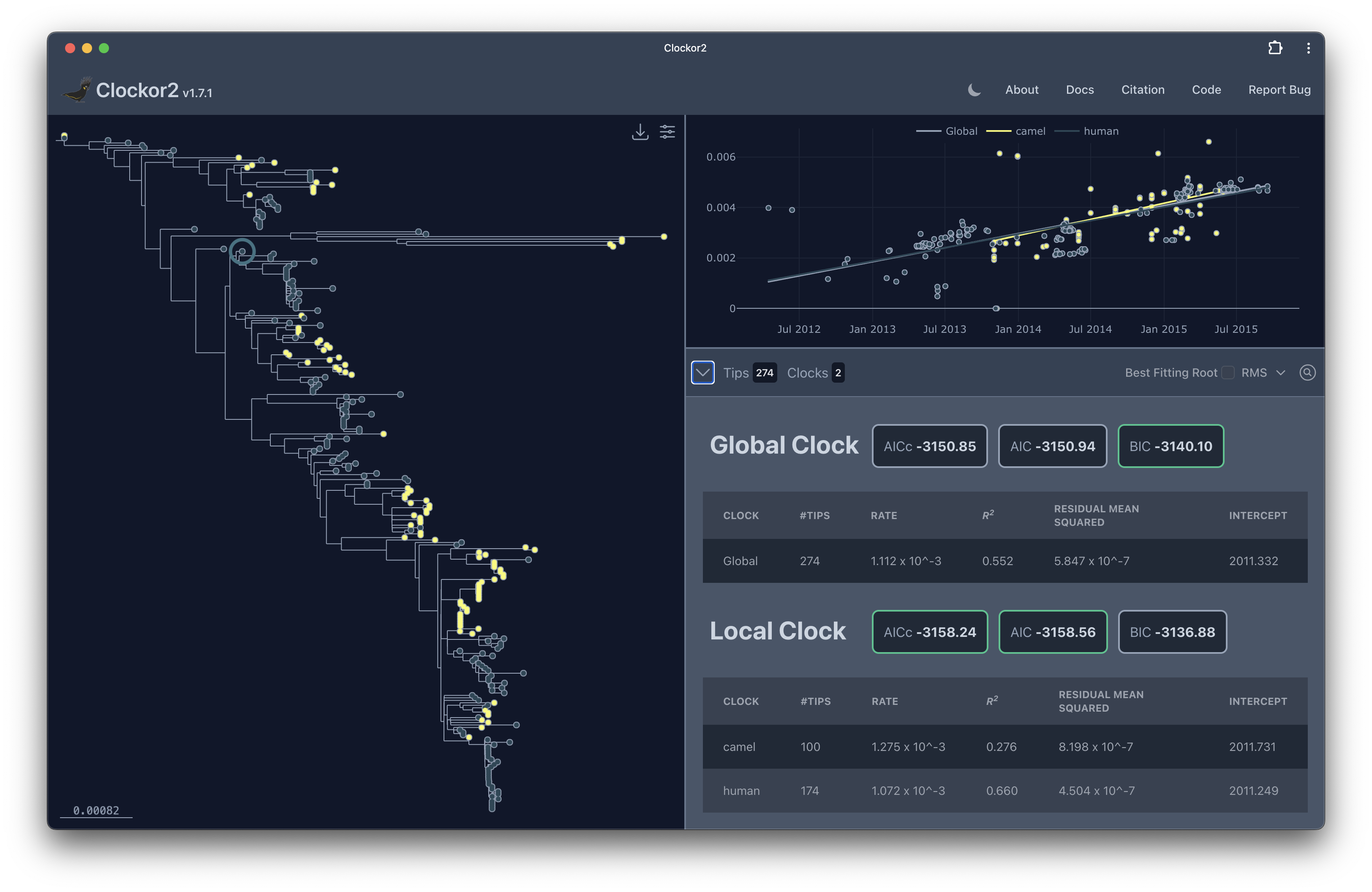
<p>Clockor2 is a webapp for performing root-to-tip regression on phylogenetic trees. Root-to-tip regression is a method for estimating the rate of molecular evolution in a phylogenetic tree. It’s a simple method that can be used to calibrate strict molecular clocks. The method is based on the assumption of clock-like evolution, that mutations accumulate at some fixed rate. Root-to-tip regression is widely used in phylogenetics and is a key quality control step in many phylogenetic analyses. A special feature of Clockor2 is that it allows you to fit multiple clocks in different parts of the tree (a clock or 2).</p>

<!--more-->
<p><img src="/assets/images/clockor-2-app.png" alt="Clockor2" /></p>

<p>Clockor2 is one of many modern tools that are moving computation back to the browser. The web ecosystem as come a long way since the days of running a janky script on a server to obtain the reverse complement of your DNA sequence. Modern features like WebAssembly, WebWorkers, and WebGL have made it possible to run complex analyses directly in the browser.</p>

<p>Clockor2 takes advantage of modern web technologies to provide a fast and responsive user interface. The tree viewer is powered by <a href="https://www.phylocanvas.gl">phylocanvas.gl</a>, a WebGL-based phylogenetic tree viewer. WebGL allows us to render large trees with thousands of tips in the browser by offloading the rendering to the GPU. The library underlying phylocanvas.gl is Deck.gl which is also used by tools like <a href="https://taxonium.org/">taxonium.org</a>. The regression plotting is powered by Plotly.js, a powerful charting library that allows us to create interactive plots, which also uses WebGL for plotting large datasets.</p>

<p>The most computationally intensive part of Clockor2 is finding the best fitting root. This involves iteratively re-rooting the tree and calculating the coefficient of determination (R^2^) or residual mean square (RMS) for each root. To speed up this process we use WebWorkers to parallelize the computation (potential rooting locations are divided into the number of cores available). WebWorkers allow us to run the computation in the background without blocking the main thread. This means that the user can continue to interact with the webapp while the computation is running. This has the added benefit that the computation will run faster on multi-core machines.</p>

<p>Clockor2 is open source and available on <a href="https://github.com/clockor2/clockor2">GitHub</a>. Github also serves as our deployment platform. We use GitHub Actions to automatically build and deploy the webapp to GitHub Pages whenever we push a new release. This means that the webapp is always up-to-date with the latest features and bug fixes. We also use GitHub Issues to track bugs and feature requests. If you have any issues or feature requests, please feel free to open an issue on GitHub.</p>

<p>We hope that Clockor2 will be a useful tool for the phylogenetics community. We are always looking for feedback and feature requests. If you have any questions or comments, please feel free to reach out to us on GitHub.</p>

<p>If you use Clockor2 in your research, please cite our paper:</p>

<div class="language-plaintext highlighter-rouge"><div class="highlight"><pre class="highlight"><code>Leo A Featherstone, Andrew Rambaut, Sebastian Duchene, Wytamma Wirth, Clockor2: Inferring global and local strict molecular clocks using root-to-tip regression, Systematic Biology, 2024;, syae003, https://doi.org/10.1093/sysbio/syae003
</code></pre></div></div>]]></content><author><name>Wytamma Wirth</name></author><category term="blog" /><category term="phylo" /><category term="clockor2" /><category term="github" /><summary type="html"><![CDATA[Our webapp for root-to-tip regression Clockor2 (clockor2.github.io) has just been published in Systematic Biology . Clockor2 is a webapp for performing root-to-tip regression on phylogenetic trees. Root-to-tip regression is a method for estimating the rate of molecular evolution in a phylogenetic tree. It’s a simple method that can be used to calibrate strict molecular clocks. The method is based on the assumption of clock-like evolution, that mutations accumulate at some fixed rate. Root-to-tip regression is widely used in phylogenetics and is a key quality control step in many phylogenetic analyses. A special feature of Clockor2 is that it allows you to fit multiple clocks in different parts of the tree (a clock or 2).]]></summary></entry><entry><title type="html">The Fall of Reason: Navigating an AI-Dominated World of Thought</title><link href="http://blog.wytamma.com/blog/fall-of-reason/" rel="alternate" type="text/html" title="The Fall of Reason: Navigating an AI-Dominated World of Thought" /><published>2023-12-07T10:00:00+10:00</published><updated>2023-12-07T10:00:00+10:00</updated><id>http://blog.wytamma.com/blog/fall-of-reason</id><content type="html" xml:base="http://blog.wytamma.com/blog/fall-of-reason/"><![CDATA[<p>The <a href="https://writings.stephenwolfram.com/2021/11/the-concept-of-the-ruliad/">ruliad</a> is everything that is computationally possible. It is the limit of following all possible paths of computation in all possible ways. The idea of a ruliad humbles thinkers faced with infinite possibilities, it is like reading your future conversations in the <a href="https://libraryofbabel.info/bookmark.cgi?hvbybyuyauuxwpmtuwfowuobe42">Library of Babel</a>.</p>

<!--more-->

<h2 id="the-infinite-solutions-within-the-ruliad">The Infinite Solutions within the Ruliad</h2>

<p>All solutions to all problems already exist. Discovering solutions in domains like mathematics and computational science becomes a matter of navigating through this immense space efficiently. Automated search strategies, leveraging self-consistency, logical reasoning, and rigorous testing, are perfectly suited for this task. But what does this mean for computational thinkers and the broader society?</p>

<h2 id="the-evolution-of-computational-thinkers">The Evolution of Computational Thinkers</h2>

<p>Computational thinkers will have to abstract themselves from direct computational thought as they will not be competitive with the performance of automated systems. Their role will shift from being direct computational problem-solvers to managers and directors of these sophisticated systems, guiding them to address complex challenges. This transition necessitates a new skill set focused more on abstract thinking, system management, and problem formulation than on direct computation.</p>

<h2 id="the-socio-computational-divide-access-and-impact">The Socio-Computational Divide: Access and Impact</h2>

<p>The vast computational power required to traverse the ruliad will restrict the number of people who can participate at the highest levels. The ‘computational elite’ will have disproportionate control over the discovery and utilization of high-value computational solutions.</p>

<h2 id="implications-for-the-average-person">Implications for the Average Person</h2>

<p>The day-to-day life of the average person will see nominal level of disruption that accompany technological advancements. The average person will continue to make the same contributions to Nobel prizing winning research as they do today.</p>

<h2 id="the-value-of-human-experience">The Value of Human Experience</h2>

<p>As reason falls humanity will rise.</p>]]></content><author><name>Wytamma Wirth</name></author><category term="blog" /><category term="AI" /><category term="llm" /><summary type="html"><![CDATA[The ruliad is everything that is computationally possible. It is the limit of following all possible paths of computation in all possible ways. The idea of a ruliad humbles thinkers faced with infinite possibilities, it is like reading your future conversations in the Library of Babel.]]></summary></entry><entry><title type="html">Using BEAST 2.7 with Snakemake</title><link href="http://blog.wytamma.com/blog/beast-2.7-snakemake/" rel="alternate" type="text/html" title="Using BEAST 2.7 with Snakemake" /><published>2023-12-07T10:00:00+10:00</published><updated>2023-12-07T10:00:00+10:00</updated><id>http://blog.wytamma.com/blog/beast-2.7-snakemake</id><content type="html" xml:base="http://blog.wytamma.com/blog/beast-2.7-snakemake/"><![CDATA[<p><a href="https://www.beast2.org/2022/09/01/what-is-new-in-v2.7.0.html">BEAST 2.7</a> is out and promises to be better than ever. However, it’s not available on conda yet. This post will show you how to use BEAST 2.7 with Snakemake to automatically install BEAST 2.7 and its packages.</p>

<p>I’ve been using Snakemake for a few years now and it’s a great tool for managing bioinformatics workflows. Check out the <a href="https://snakemake.readthedocs.io/en/stable/tutorial/tutorial.html">Snakemake Tutorial</a> for a quick introduction.</p>

<!--more-->

<p>BEAST 2.7 isn’t currently available on conda, however, we can use a <a href="https://snakemake.readthedocs.io/en/stable/snakefiles/deployment.html#providing-post-deployment-scripts">post-deployment</a> script to install it into a Snakemake pipeline. Post-deployment scripts are run after a environment is created and can be used to install additional packages or perform other tasks.</p>

<p>The following script will download and install BEAST 2.7.6. It will also install the ReMASTER package (as an example). You can add additional packages by adding them to the <code class="language-plaintext highlighter-rouge">PACKAGES</code> array and change the BEAST version by changing the <code class="language-plaintext highlighter-rouge">VERSION</code> variable.</p>

<p>It’s not that important to understand the script, but I’ve added comments to explain what it’s doing. The script is designed to be platform agnostic and will download the appropriate version of BEAST 2.7 for your operating system.</p>

<div class="language-bash highlighter-rouge"><div class="highlight"><pre class="highlight"><code><span class="c">#!env bash</span>
<span class="nb">set</span> <span class="nt">-o</span> pipefail
<span class="nb">set</span> <span class="nt">-e</span> <span class="c"># Exit on error</span>

<span class="c"># Define the version variable</span>
<span class="nv">VERSION</span><span class="o">=</span><span class="s2">"2.7.6"</span>
<span class="c"># array of packages to install</span>
<span class="nv">PACKAGES</span><span class="o">=(</span><span class="s2">"ReMASTER"</span><span class="o">)</span>

<span class="c"># Function to download, install, and symlink</span>
download_install_symlink<span class="o">()</span> <span class="o">{</span>
    <span class="nv">os</span><span class="o">=</span><span class="si">$(</span><span class="nb">uname</span> <span class="nt">-s</span><span class="si">)</span>
    <span class="nb">arch</span><span class="o">=</span><span class="si">$(</span><span class="nb">uname</span> <span class="nt">-m</span><span class="si">)</span>
    <span class="nv">file</span><span class="o">=</span><span class="s2">""</span>

    <span class="c"># change to the envs directory</span>
    <span class="nb">cd</span> <span class="nv">$CONDA_PREFIX</span>

    <span class="c"># Download and Install</span>
    <span class="k">if</span> <span class="o">[[</span> <span class="s2">"</span><span class="nv">$os</span><span class="s2">"</span> <span class="o">==</span> <span class="s2">"Darwin"</span> <span class="o">]]</span><span class="p">;</span> <span class="k">then
        </span><span class="nv">file</span><span class="o">=</span><span class="s2">"BEAST.v</span><span class="nv">$VERSION</span><span class="s2">.Mac.dmg"</span>
        curl <span class="nt">-LO</span> <span class="s2">"https://github.com/CompEvol/beast2/releases/download/v</span><span class="nv">$VERSION</span><span class="s2">/</span><span class="nv">$file</span><span class="s2">"</span>
        hdiutil mount <span class="s2">"</span><span class="nv">$file</span><span class="s2">"</span>  <span class="c"># This mounts the dmg file</span>
        <span class="nb">cp</span> <span class="nt">-R</span> <span class="s2">"/Volumes/BEAST v</span><span class="nv">$VERSION</span><span class="s2">/BEAST </span><span class="nv">$VERSION</span><span class="s2">/"</span> <span class="s2">"</span><span class="nv">$CONDA_PREFIX</span><span class="s2">/lib/beast"</span>
        hdiutil unmount <span class="s2">"/Volumes/BEAST v</span><span class="nv">$VERSION</span><span class="s2">/"</span>
    <span class="k">elif</span> <span class="o">[[</span> <span class="s2">"</span><span class="nv">$os</span><span class="s2">"</span> <span class="o">==</span> <span class="s2">"Linux"</span> <span class="o">]]</span><span class="p">;</span> <span class="k">then
        if</span> <span class="o">[[</span> <span class="s2">"</span><span class="nv">$arch</span><span class="s2">"</span> <span class="o">==</span> <span class="s2">"x86_64"</span> <span class="o">]]</span><span class="p">;</span> <span class="k">then
            </span><span class="nv">file</span><span class="o">=</span><span class="s2">"BEAST.v</span><span class="nv">$VERSION</span><span class="s2">.Linux.x86.tgz"</span>
        <span class="k">elif</span> <span class="o">[[</span> <span class="s2">"</span><span class="nv">$arch</span><span class="s2">"</span> <span class="o">==</span> <span class="s2">"aarch64"</span> <span class="o">]]</span><span class="p">;</span> <span class="k">then
            </span><span class="nv">file</span><span class="o">=</span><span class="s2">"BEAST.v</span><span class="nv">$VERSION</span><span class="s2">.Linux.aarch64.tgz"</span>
        <span class="k">else
            </span><span class="nb">echo</span> <span class="s2">"Unsupported architecture"</span>
            <span class="k">return </span>1
        <span class="k">fi
        </span>curl <span class="nt">-LO</span> <span class="s2">"https://github.com/CompEvol/beast2/releases/download/v</span><span class="nv">$VERSION</span><span class="s2">/</span><span class="nv">$file</span><span class="s2">"</span>
        <span class="nb">tar</span> <span class="nt">-xzvf</span> <span class="s2">"</span><span class="nv">$file</span><span class="s2">"</span>
        <span class="nb">mv </span>beast <span class="s2">"</span><span class="nv">$CONDA_PREFIX</span><span class="s2">/lib/beast"</span>
    <span class="k">else
        </span><span class="nb">echo</span> <span class="s2">"Unsupported operating system"</span>
        <span class="k">return </span>1
    <span class="k">fi</span>

    <span class="c"># Create symlinks</span>
    <span class="k">for </span>cmd <span class="k">in</span> <span class="s2">"</span><span class="nv">$CONDA_PREFIX</span><span class="s2">/lib/beast/bin/"</span><span class="k">*</span><span class="p">;</span> <span class="k">do
        </span><span class="nb">ln</span> <span class="nt">-sf</span> <span class="s2">"</span><span class="nv">$cmd</span><span class="s2">"</span> <span class="s2">"</span><span class="nv">$CONDA_PREFIX</span><span class="s2">/bin/"</span>
    <span class="k">done</span>
    
    <span class="c"># Remove the downloaded file</span>
    <span class="nb">rm</span> <span class="nt">-rf</span> <span class="s2">"</span><span class="nv">$file</span><span class="s2">"</span>
<span class="o">}</span>

<span class="c"># Call the function</span>
download_install_symlink

<span class="c"># This script is used to add packages to beast after the beast.yaml env is installed</span>
beast <span class="nt">-version</span>  <span class="c"># Need to call beast once (even just to query the version) to create support dirs</span>

<span class="c"># Install packages</span>
<span class="k">for </span>package <span class="k">in</span> <span class="s2">"</span><span class="k">${</span><span class="nv">PACKAGES</span><span class="p">[@]</span><span class="k">}</span><span class="s2">"</span><span class="p">;</span> <span class="k">do
    </span>packagemanager <span class="nt">-add</span> <span class="s2">"</span><span class="nv">$package</span><span class="s2">"</span>
<span class="k">done</span>

<span class="c"># Activate script: Set up LD_LIBRARY_PATH for beagle</span>
<span class="nb">echo</span> <span class="nt">-e</span> <span class="s1">'export LD_LIBRARY_PATH_CONDA_BACKUP="${LD_LIBRARY_PATH:-}"\nexport LD_LIBRARY_PATH=$CONDA_PREFIX/lib:${LD_LIBRARY_PATH:-}'</span> <span class="o">&gt;</span> <span class="s2">"</span><span class="nv">$CONDA_PREFIX</span><span class="s2">/etc/conda/activate.d/beagle_activate.sh"</span>

<span class="c"># Deactivate script: Restore original LD_LIBRARY_PATH and clean up</span>
<span class="nb">echo</span> <span class="nt">-e</span> <span class="s1">'export LD_LIBRARY_PATH=${LD_LIBRARY_PATH_CONDA_BACKUP:-}\nunset LD_LIBRARY_PATH_CONDA_BACKUP\n[ -z "$LD_LIBRARY_PATH" ] &amp;&amp; unset LD_LIBRARY_PATH'</span> <span class="o">&gt;</span> <span class="s2">"</span><span class="nv">$CONDA_PREFIX</span><span class="s2">/etc/conda/deactivate.d/beagle_deactivate.sh"</span>
</code></pre></div></div>

<p>The script will be used with a <a href="https://snakemake.readthedocs.io/en/stable/snakefiles/deployment.html#integrated-package-management">Snakemake environment file</a>. Post-deployment scripts are run after the env is installed and must be named <code class="language-plaintext highlighter-rouge">&lt;envname&gt;.post-deploy.sh</code>. For example, if your env is called <code class="language-plaintext highlighter-rouge">beast.yaml</code>, the post-deployment script above should be located next to the environment file and called <code class="language-plaintext highlighter-rouge">beast.post-deploy.sh</code>.</p>

<p>Here’s an example env file that installs beagle-lib (env must install something). The post-deployment script will run after and install BEAST 2.7 and ReMASTER.</p>

<div class="language-yaml highlighter-rouge"><div class="highlight"><pre class="highlight"><code><span class="c1"># envs/beast.yaml</span>
<span class="na">channels</span><span class="pi">:</span>
  <span class="pi">-</span> <span class="s">bioconda</span>
  <span class="pi">-</span> <span class="s">conda-forge</span>
<span class="na">dependencies</span><span class="pi">:</span>
  <span class="pi">-</span> <span class="s">beagle-lib==4.0.1</span>
</code></pre></div></div>

<p>Here’s an example Snakefile that uses the BEAST 2.7 env.</p>

<div class="language-python highlighter-rouge"><div class="highlight"><pre class="highlight"><code><span class="c1"># Snakefile
</span><span class="n">rule</span> <span class="n">beast_version</span><span class="p">:</span>
    <span class="n">conda</span><span class="p">:</span> <span class="s">"envs/beast.yaml"</span>
    <span class="n">output</span><span class="p">:</span> <span class="s">"beast.version"</span>
    <span class="n">shell</span><span class="p">:</span> <span class="s">"beast -version &gt; {output}"</span>
</code></pre></div></div>

<p>The workflow directory should look like this:</p>

<div class="language-bash highlighter-rouge"><div class="highlight"><pre class="highlight"><code>workflow/
├── envs
│   ├── beast.post-deploy.sh
│   └── beast.yaml
└── Snakefile
</code></pre></div></div>

<p>You can run the workflow with the following command:</p>

<div class="language-bash highlighter-rouge"><div class="highlight"><pre class="highlight"><code>snakemake <span class="nt">--cores</span> 1 <span class="nt">--use-conda</span> <span class="nt">-R</span> beast_version  
</code></pre></div></div>

<p>This will install BEAST 2.7 (the first time you run it) and run the <code class="language-plaintext highlighter-rouge">beast_version</code> rule. The <code class="language-plaintext highlighter-rouge">--use-conda</code> flag tells Snakemake to use the env specified in the rule. The <code class="language-plaintext highlighter-rouge">-R</code> flag tells Snakemake to run the specified rule and all of its dependencies.</p>

<p>A complete example can be found at <a href="https://github.com/Wytamma/using-beast-2.7-with-snakemake">https://github.com/Wytamma/using-beast-2.7-with-snakemake</a>.</p>]]></content><author><name>Wytamma Wirth</name></author><category term="blog" /><category term="beast" /><category term="snakemake" /><category term="bioinformatics" /><summary type="html"><![CDATA[BEAST 2.7 is out and promises to be better than ever. However, it’s not available on conda yet. This post will show you how to use BEAST 2.7 with Snakemake to automatically install BEAST 2.7 and its packages. I’ve been using Snakemake for a few years now and it’s a great tool for managing bioinformatics workflows. Check out the Snakemake Tutorial for a quick introduction.]]></summary></entry><entry><title type="html">🐙🐁 BEASTIARY 🐁🐙</title><link href="http://blog.wytamma.com/project/beastiary/" rel="alternate" type="text/html" title="🐙🐁 BEASTIARY 🐁🐙" /><published>2021-11-24T10:00:00+10:00</published><updated>2021-11-24T10:00:00+10:00</updated><id>http://blog.wytamma.com/project/beastiary</id><content type="html" xml:base="http://blog.wytamma.com/project/beastiary/"><![CDATA[<p>Introducing <a href="https://beastiary.wytamma.com/">Beastiary</a>, a package designed for visualising and analysing MCMC trace files generated from Bayesian phylogenetic analyses.</p>

<!--more-->

<p>Applications for performing Bayesian phylogenetic analyses typical sample for the posterior distribution sequentially. One of the big hurdles with using these applications is knowing when to stop sampling. Typically research will run an analysis and look at the samples after their analysis is completed to see if they have collected enough samples. However, these samples are collected in real-time, which leaves open the opportunity for real-time analysis. On top of this analyses are commonly run on remote servers e.g. a HPC.</p>

<p>Beastiary is essentially a data visualisation web-app, it watches the log files generated by Bayesian phylogenetic software and updates plots in real-time. This enables researchers to determine if they have enough samples before their analysis has completed. Because it is a webapp is can easily be deployed to remote servers like a HPC.</p>

<p>Check out our paper: Wytamma Wirth, Sebastian Duchene, Real-Time and Remote MCMC Trace Inspection with Beastiary, Molecular Biology and Evolution, Volume 39, Issue 5, May 2022, msac095, <a href="https://academic.oup.com/mbe/article/39/5/msac095/6584747">https://doi.org/10.1093/molbev/msac095
</a></p>]]></content><author><name>Wytamma Wirth</name></author><category term="project" /><category term="package" /><category term="statistics" /><category term="HPC" /><summary type="html"><![CDATA[Introducing Beastiary, a package designed for visualising and analysing MCMC trace files generated from Bayesian phylogenetic analyses.]]></summary></entry><entry><title type="html">Your Virologist Friend</title><link href="http://blog.wytamma.com/blog/your-virologist-friend/" rel="alternate" type="text/html" title="Your Virologist Friend" /><published>2021-10-28T10:00:00+10:00</published><updated>2021-10-28T10:00:00+10:00</updated><id>http://blog.wytamma.com/blog/your-virologist-friend</id><content type="html" xml:base="http://blog.wytamma.com/blog/your-virologist-friend/"><![CDATA[<p>Here are a few post I’ve made about the ongoing pandemic.</p>

<h2 id="24th-of-january-2020---in-the-beginning">24th of January 2020 - In the beginning</h2>

<p>I thought I should say something about the current coronavirus out break from China. There is a lot of panic in the media because this is a novel virus, however, the risk to yourself is still very low compared to something like the flu. Last year in Queensland alone the flu killed 264 people. Wash your hands regularly, cover your nose (dab) when you sneeze, and don’t panic.</p>

<p>Your virologist friend,</p>

<p>Wytamma</p>

<p>P.S. It’s also probably a good idea to avoid live animal markets in Central China for a little while.</p>

<h2 id="3rd-of-march-2020---pandemic">3rd of March 2020 - Pandemic</h2>

<p>As the total number for coronavirus cases approaches 100,000 it’s time to prepare but not panic. It is likely that the world health organisation will soon declare a pandemic. Indeed, Australia has already put it’s emergency health response plan into action (the trigger is a likely pandemic). This will not be a zombie apocalypse, but you may experience some disruption to your daily activities. Sick people will need to be isolated to reduce the spread of the virus. That means that people won’t show up for work and things will slow down for a little while. We are already seeing some disruption to supply chains. With this in mind it’s important to be prepared if you need to spend some time indoors. Have nonperishable food for everyone in your house and a months worth of any prescription medication. There is no imminent threat to your health, but a few extra cans of baked beans can’t hurt.</p>

<p>Some things to remember:</p>
<ul>
  <li>Racism will not protect you from this virus.</li>
  <li>Dab when you sneeze.</li>
  <li>Wash your hands regularly.</li>
  <li>Give sick people a metre distance (this virus is not airborne but you can get it from fluids e.g. in a sneeze).</li>
  <li>You are still more likely to die from the flu (GET YOUR FLU SHOT!!).</li>
</ul>

<p>Your virologist friend,</p>

<p>Wytamma</p>

<h2 id="24th-of-april-2020---this-is-not-news">24th of April 2020 - This Is Not News</h2>

<p>In this episode of This Is Not News I sit down with Wytamma Wirth who is a current PHD Student at JCU Townsville.  He has a Bachelor degree in Biochemistry, Honours in Microbiology &amp; Immunology and is currently completing his PHD in Epidemiology &amp; Pathology.</p>

<p>In this episode we discuss what is known about the Novel Coronavirus, the race to find a Vaccine, possible options till we find a Vaccine, how the virus causes its symptoms, mutations in the virus plus more.</p>

<iframe src="https://www.youtube.com/embed/SD9sZ8AjUnQ" title="YouTube video player" frameborder="0" allow="accelerometer; autoplay; clipboard-write; encrypted-media; gyroscope; picture-in-picture" allowfullscreen=""></iframe>

<h2 id="28th-of-september-2020---1-million-deaths">28th of September 2020 - 1 million deaths</h2>

<p>Today we passed 1 million covid-19 deaths. It’s a number with a magnitude I struggle to comprehend. We have been doing reasonably well here in Australia, but this is a pandemic, it is a global problem that requires effort from everyone. Going forward, we know that testing and isolation work. If you feel sick, get tested. Physically distance yourself from unnecessary contact but don’t socially distance. Vaccines are coming, but they’re still a while away. Although this sounds bleak, it’s not the end. Cherish any time with reduced restriction, it may not last, and with 1 million fewer lives in the world, it is worth cherishing every last bit.</p>

<h2 id="20th-of-october-2021---vaccines">20th of October 2021 - Vaccines</h2>

<p>We are marching towards reopening, however, when we do everything will not return to normal. There will be more lockdowns and more deaths, but there will be less deaths than if we didn’t live in a world that gets to reap the benefits of modern science.</p>

<p>Vaccines are not perfect, anyone who tells you that is lying. However, vaccines are the best defence we’ve got right now (and probably will ever have). Vaccines help reduce the spread of covid, they will not stop the spread. But reduced spread means less pressure on hospitals. The vaccine will reduce your risk of severe disease when you get covid. You are far less like to die if you are vaccinated, but you could still get sick. If you have the opportunity, get vaccinated now.
For those of you in remote or regional areas that haven’t experienced much disruption. I’m sorry but covid is coming for you. This virus is here to stay, eventually everyone will be infected. As the world reopens there will be more and more spillover until the virus is endemic globally. If you live somewhere they get the common cold, you’ll eventually get a SARS-CoV-2 infection.</p>

<p>If you’re already vaccinated you should know that you will have to get more jabs. It might be a booster or new vaccine for different variants, but you’ll be rolling up your sleeve again, maybe sooner than you think.</p>

<p>Pretty soon, a lot of people who die from covid will be vaccinated. This makes sense, if everyone is vaccinated then everyone who gets covid will be vaccinated, and therefore everyone who dies from covid will be vaccinated. This is not to say the vaccines don’t work, they reduce your risk of dying, but they are not 100%. Don’t fall into the trap of thinking that the vaccines are ineffective just because vaccinated people are dying or getting sick.</p>

<p>This is a long way from over, but things are definitely looking better than they were.</p>

<p>Your virologist friend,</p>

<p>Wytamma</p>]]></content><author><name>Wytamma Wirth</name></author><category term="blog" /><category term="Virology" /><category term="Covid" /><summary type="html"><![CDATA[Here are a few post I’ve made about the ongoing pandemic. 24th of January 2020 - In the beginning I thought I should say something about the current coronavirus out break from China. There is a lot of panic in the media because this is a novel virus, however, the risk to yourself is still very low compared to something like the flu. Last year in Queensland alone the flu killed 264 people. Wash your hands regularly, cover your nose (dab) when you sneeze, and don’t panic. Your virologist friend, Wytamma P.S. It’s also probably a good idea to avoid live animal markets in Central China for a little while. 3rd of March 2020 - Pandemic As the total number for coronavirus cases approaches 100,000 it’s time to prepare but not panic. It is likely that the world health organisation will soon declare a pandemic. Indeed, Australia has already put it’s emergency health response plan into action (the trigger is a likely pandemic). This will not be a zombie apocalypse, but you may experience some disruption to your daily activities. Sick people will need to be isolated to reduce the spread of the virus. That means that people won’t show up for work and things will slow down for a little while. We are already seeing some disruption to supply chains. With this in mind it’s important to be prepared if you need to spend some time indoors. Have nonperishable food for everyone in your house and a months worth of any prescription medication. There is no imminent threat to your health, but a few extra cans of baked beans can’t hurt. Some things to remember: Racism will not protect you from this virus. Dab when you sneeze. Wash your hands regularly. Give sick people a metre distance (this virus is not airborne but you can get it from fluids e.g. in a sneeze). You are still more likely to die from the flu (GET YOUR FLU SHOT!!). Your virologist friend, Wytamma 24th of April 2020 - This Is Not News In this episode of This Is Not News I sit down with Wytamma Wirth who is a current PHD Student at JCU Townsville. He has a Bachelor degree in Biochemistry, Honours in Microbiology &amp; Immunology and is currently completing his PHD in Epidemiology &amp; Pathology. In this episode we discuss what is known about the Novel Coronavirus, the race to find a Vaccine, possible options till we find a Vaccine, how the virus causes its symptoms, mutations in the virus plus more. 28th of September 2020 - 1 million deaths Today we passed 1 million covid-19 deaths. It’s a number with a magnitude I struggle to comprehend. We have been doing reasonably well here in Australia, but this is a pandemic, it is a global problem that requires effort from everyone. Going forward, we know that testing and isolation work. If you feel sick, get tested. Physically distance yourself from unnecessary contact but don’t socially distance. Vaccines are coming, but they’re still a while away. Although this sounds bleak, it’s not the end. Cherish any time with reduced restriction, it may not last, and with 1 million fewer lives in the world, it is worth cherishing every last bit. 20th of October 2021 - Vaccines We are marching towards reopening, however, when we do everything will not return to normal. There will be more lockdowns and more deaths, but there will be less deaths than if we didn’t live in a world that gets to reap the benefits of modern science. Vaccines are not perfect, anyone who tells you that is lying. However, vaccines are the best defence we’ve got right now (and probably will ever have). Vaccines help reduce the spread of covid, they will not stop the spread. But reduced spread means less pressure on hospitals. The vaccine will reduce your risk of severe disease when you get covid. You are far less like to die if you are vaccinated, but you could still get sick. If you have the opportunity, get vaccinated now. For those of you in remote or regional areas that haven’t experienced much disruption. I’m sorry but covid is coming for you. This virus is here to stay, eventually everyone will be infected. As the world reopens there will be more and more spillover until the virus is endemic globally. If you live somewhere they get the common cold, you’ll eventually get a SARS-CoV-2 infection. If you’re already vaccinated you should know that you will have to get more jabs. It might be a booster or new vaccine for different variants, but you’ll be rolling up your sleeve again, maybe sooner than you think. Pretty soon, a lot of people who die from covid will be vaccinated. This makes sense, if everyone is vaccinated then everyone who gets covid will be vaccinated, and therefore everyone who dies from covid will be vaccinated. This is not to say the vaccines don’t work, they reduce your risk of dying, but they are not 100%. Don’t fall into the trap of thinking that the vaccines are ineffective just because vaccinated people are dying or getting sick. This is a long way from over, but things are definitely looking better than they were. Your virologist friend, Wytamma]]></summary></entry></feed>